MOHRE E-Signature Card UAE 2026: A Complete Guide Of Apply Via Tasheel, Cost, Activation And Benefits
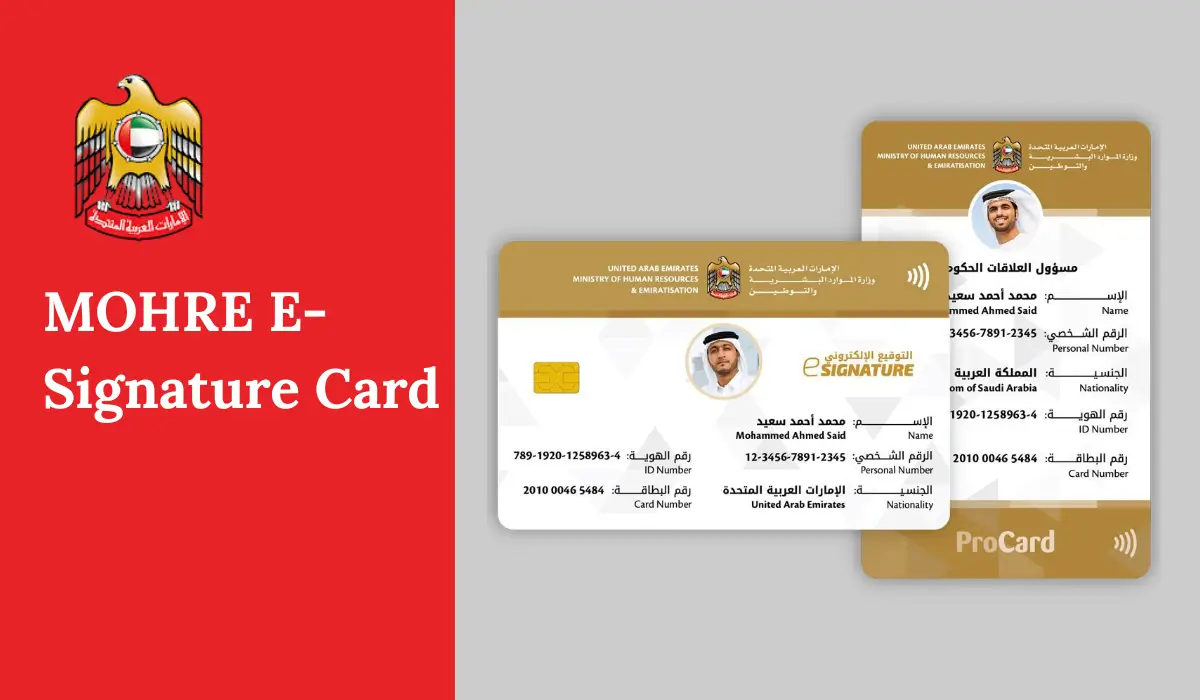
MOHRE E-Signature Card. If you work or run a business in the UAE, you already know one truth. Many labour and company tasks move fast only when your identity is verified inside MOHRE systems. That is where the MOHRE e-Signature Card (often called E-Signature Card UAE or E-Sign Card) became important.
In this guide, I will explain the e-signature card simply. You will learn what it is, who needs it, what documents you should keep ready, and how the process usually works through Tasheel and other MOHRE service channels.
What is the MOHRE e-Signature Card?
The MOHRE e-Signature card is an identification tool that helps an authorised person sign and complete MOHRE labour transactions digitally. MOHRE explained that the card stores important data and biometrics (like fingerprints) so only authorised users can complete transactions on MOHRE systems.
Think of it like this.
- Your company has a legal signatory (owner, partner, authorised signatory, or delegate).
- MOHRE needs strong proof that the person who signs a labour transaction is truly that person.
- The e-Signature card supports that proof inside MOHRE service channels.
MOHRE also shared that cardholders can receive a monthly statement that lists transactions.
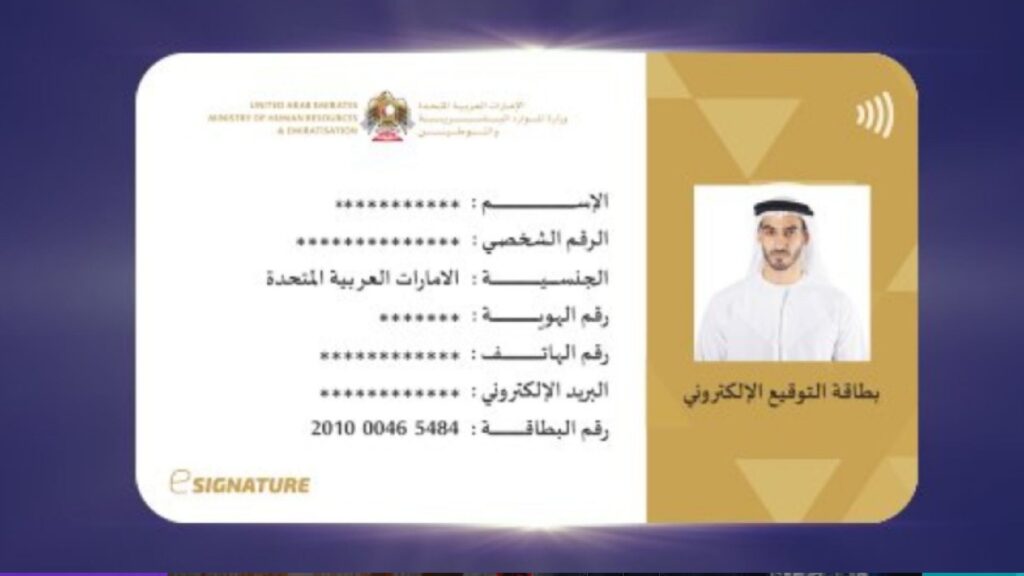
What is the e-Signature Card used for in the UAE?
The MOHRE e-Signature Card works like your official “permission key” for MOHRE online services. It allows you to complete important labour transactions safely and without delays.
Here is what you can use the e-Signature Card UAE for:
- Signing and completing MOHRE transactions: You need the card to e-sign documents and finish transactions through MOHRE service channels. This includes the MOHRE mobile app, approved service centres, and Tawseel service vehicles.
- Secure access for only authorised users: MOHRE uses this card to protect its digital system. That means only approved signatories can submit or complete sensitive actions. It reduces misuse and keeps company records safe.
- Monthly balance statement and activity tracking: The card holder receives a monthly balance statement that shows the transactions and movements made through the card. This helps with tracking and accountability.
- Strong security in Dubai and across the UAE: The e-Signature Card is built for secure use, and it is widely used in Dubai for protected signing and official labour-related processing.
Why People Call it “E-Signature Card UAE”
In the UAE, “e-signature” can mean two things:
- A general electronic signature used for digital documents under UAE law.
- The MOHRE e-Signature card, which is a specific tool used for MOHRE labour services.
This article focuses on the second one. But legal background matters too, because MOHRE e-signing sits inside the UAE’s wider digital trust system.
The legal Side in Simple words
The UAE recognises electronic transactions and trust services under Federal Decree-Law No. 46 of 2021 on Electronic Transactions and Trust Services. The official UAE legislation portal lists key definitions like “Trust Service Provider” and shows that this law covers electronic trust services in the UAE.
The English PDF version of the law defines an Electronic Signature as a signature made from letters, numbers, symbols, voice, fingerprint, or an electronic process, linked to an electronic document to verify identity and acceptance.
It also explains the role of licensed trust providers and the UAE trust framework that TDRA supervises.
So, the big picture is simple:
- The UAE supports digital signing.
- The law sets rules for trust, identity, and licensed providers.
- MOHRE uses secure tools inside its systems to protect labour data and transactions.
First Requirement: you must have a labour file
Many people get stuck at the start. They try to apply, but their file does not exist, or it is not active.
For employees
You usually need an active MOHRE record linked to your work contract and your employer’s registration. In simple terms, MOHRE must “know you” in the system.

For business owners / investors
Your company must be registered with the right authority (mainland economic department or a free zone). Your role should also be clear in official records.
Your labour file number matters because MOHRE uses it as a unique identifier for employment and compliance.
Documents required for E-Signature Card UAE
Your exact list can vary by role and provider, but these are common requirements:
Identity documents
- Emirates ID (if applicable)
- Passport copy (often needed for identity verification)
Labour file details
- Your labour file number or relevant file details
Business documents (for owners / companies)
- Trade licence copy
- Company registration documents
- Proof that you are an owner, partner, or authorised signatory
Contact details
- Active UAE mobile number
- Email address (often used for approvals and notifications)
Keep scanned copies ready. Many delays happen because a name spelling, document expiry, or file number does not match.
Apply For An eSignature Card Step-Step Online Process
Follow some of these steps below:
Step 1: Choose the Right Authority or Provider
First, you need to pick the correct approved place to start your request.
In the UAE, this usually depends on your case and the service type.
In most cases, you will be guided to:
- Tawjeeh Centre, or
- Tasheel Centre
These centres follow MOHRE-linked processes, so they help you move forward without confusion.
Step 2: Prepare the Required Documents
Before you submit anything, keep your documents ready. This saves time and prevents delays.
You usually need:
1) Identification documents
Bring a valid ID such as:
- Passport
- National ID (if required)
- Emirates ID (if applicable)
2) Labour file details
Your labour file number is very important.
This is a unique number given to employees registered in MOHRE. MOHRE uses it to track your employment record and process labour services.
3) Other supporting documents (if required)
Sometimes the provider may ask for:
- Proof of address
- Business registration papers (if you apply as a business owner)
- Any extra document based on your role
Step 3: Submit Your Application
Now you move to the application stage.
You will do two simple things:
- Fill out the form given by the provider
- Submit all required documents as requested
Make sure your details match your official records. Small mismatches can slow the process.
Step 4: Identity Verification and Issuance
After submission, the provider checks your identity and verifies your data.
Once approval is done:
- Your eSignature card (or approved signing method) gets created
- You receive it either:
- Physically, or
- Electronically, depending on the provider’s process
That’s it. After you receive it, the next stage is usually activation and testing, so you can confirm it works properly for signing and MOHRE transactions.

Where Was the e-Signature Card issued?
MOHRE has long worked with service centers and digital channels. In its 2019 update, MOHRE said people could complete transactions through channels like the MOHRE app, service centres, and Tawseel vehicles.
Many applicants went through:
- Tas’heel service centres (common for labour services)
- Sometimes Tawjeeh centres (for guidance in labour-related services)
UAE E-Signature Card Terms and Conditions
When you receive your UAE e-signature card, a few basic terms are important to understand. These are not strict rules, but they help you use the card correctly and avoid delays.
1) Issuance Time
After your application gets accepted, MOHRE usually issues the e-signature card within 1 to 2 working days. In most cases, you do not need to wait long once your request is approved.
2) Card Charges
A new e-signature card generally costs between AED 120 and AED 200. Keep in mind, this amount usually does not include:
- Service centre fees
- Any extra taxes (if applicable)
So, the final amount can be a little higher depending on where you apply.
3) Easy Application Status Tracking
Tracking your application status is simple. You can:
- Call MOHRE call centre at 600590000 (available from 8 AM to 8 PM)
- Or check updates through the official MOHRE mobile app
4) Active File Requirement
To use the e-signature card, the authorised signatory must have:
- An active MOHRE file
- A personal identification number (PIN)
MOHRE requires this to keep records secure and to ensure only the right person can sign and complete transactions.
How to Activate the E-Signature Card (and how to test it)
After you receive the card or access method, activation is the next step.
Activation usually includes:
- Following issuer instructions
- Entering an activation code (if provided)
- Completing an online activation step through the issuer platform
Testing the card
Do a simple test:
- Sign a sample document (if your provider offers this)
- Run a test transaction at the service centre
- Confirm that your signature works and your role appears correctly
If the test fails, it usually comes from:
- Wrong file number
- Mismatch in Emirates ID / passport details
- Role not updated in the system
- Expired trade licence or outdated company details
Fix the root issue first. Repeating the same step again and again will not help.ance stopped, the idea stays the same: MOHRE needs a secure way to confirm you are the right signer.
Who needs the MOHRE E-Signature Card?
You may need this card if you handle MOHRE services in the UAE, such as:
Business owners and partners
If you own a mainland company or free zone company and you must sign labour-related requests, you often need an authorised way to sign on MOHRE systems.
Authorised signatories
If your company has a manager, HR head, or signatory who signs MOHRE requests, that person may need the card.
Delegates and PRO staff
If your company appoints a delegate to submit and complete transactions, MOHRE systems usually require authorised access for sensitive actions.

Some employees (case-based)
For many employees, the employer handles MOHRE steps. Still, employees may need to confirm details, contracts, or approvals depending on the process and company setup.
How Much does the MOHRE E-Signature Card cost?
Costs can vary by service channel and support service. But the pricing many people refer to includes:
- AED 120 to apply for an e-signature card
- AED 80 for opening a personal file with MOHRE (when required)
Important: always confirm the final amount at your service centre because extra service fees can apply based on the exact transaction type and centre rules.
How to Update a Lost or Damaged MOHRE E-Signature Card
If your e-signature card is lost, stolen, or damaged, act fast. This helps you stop misuse and keeps your MOHRE transactions safe. Follow these simple steps.
1) Report the Issue Immediately
Do not wait. Report the card as soon as you notice the problem. This reduces the risk of anyone using it without your permission.
Where to report
- Visit your nearest MOHRE-approved service centre Amer, Tasheel, or Taqyeem
- You can also contact MOHRE Customer Service for guidance
2) Collect the Required Documents
When you request cancellation or replacement, keep these documents ready:
- Valid Emirates ID
- Passport copy
- Visa page copy
- Trade licence (for business owners or company signatories)
- Police report (important if the card is lost or stolen)
- Old or damaged card (only if you still have it)
Tip: Make clear copies. Missing documents can delay the process.
3) Visit the Service Centre and Submit Your Request
Go to the nearest Tasheel or MOHRE service centre and request one of the following:
- Cancel the e-signature card (if lost, stolen, or you want to block it)
- Replace the card (if lost or physically damaged)
The staff will check your file and guide you through the form.
4) Pay the Fees
You usually need to pay a replacement or cancellation fee.
- Typical range: AED 200 to AED 300
- Final fee can vary based on your case and service channel
5) Receive Your New Card
After approval and payment:
- Your new e-signature card will be processed and issued
- You will get an SMS or email update
- Processing time is often 3 to 5 working days
6) Update Your Company Records
Once you get the new card, do this immediately:
- Ask your HR or PRO team to update the new card number in all MOHRE systems
- Update any related company records and internal documents
This step matters because old card details can block future transactions.
Why the UAE pushed e-Signature tools so strongly
You feel the benefit the first time you use it properly.
Faster labour transactions
You do not depend on manual signatures and repeated visits for identity proof.
Better security for companies
MOHRE’s logic is clear. It allows only authorised people to complete transactions, which improves confidentiality and protection of labour data.
Clear accountability
Monthly statements help track what happened in your company file.
Where you can use it (MOHRE website)
MOHRE stated the card supports transactions through:
- MOHRE app
- Service centres
- Tawseel vehicles
This matters because many businesses use more than one channel. Some tasks happen faster in the app. Others require a service centre.
What if you lose the e-Signature card?
Losing it is serious because it connects to signing authority.
Do these steps quickly:
- Inform your company management (if you work as a delegate or signatory).
- Contact the relevant service channel that issued it or manages it.
- Ask them to block or deactivate the lost credential to protect your MOHRE file access.
Even if a new card is not issued after October 2025, the “block access” step still matters.
E-Signature Card UAE VS a Normal E-Signature: Don’t Mix Them
Many people confuse two things:
- A general electronic signature: This can be a simple click-to-sign, an image signature, or a typed name in a document. It may work for private contracts, but it depends on the platform and the risk level.
- A regulated UAE e-signature under trust services: The UAE has a legal framework for electronic transactions and trust services. This gives electronic signatures legal weight when they meet required standards. .
- The MOHRE e-signature card: This is a MOHRE workflow tool for labour and employment transactions. It helps you authenticate and sign on MOHRE channels. It is not the same as every other e-signature product you see online.
What is “GCC contract renewal” doing in this topic?
You may see e-signature card steps shown next to GCC contract renewal steps. That is because many contract actions require secure signing.
When you renew a work contract, you must ensure:
- The contract terms match the real job
- Salary, allowances, and job title are correct
- Documents are current
- The authorised person signs the submission
The e-signature card supports those signing and submission steps when MOHRE requires authorised digital sign-off.
E-Signature Card UAE across sectors (Where it helps beyond MOHRE)
Even though the MOHRE e-signature card is labour focused, the UAE’s push for digital signing has impacts across sectors. Many industries now rely on electronic signing flows:
Healthcare
- Patient consent forms
- Medical admin approvals
- Faster processing with less paperwork
Real estate
- Faster contract signing
- Remote signing for buyers and sellers
Education
- Admissions and consent forms
- Student admin approvals
Legal services
- Client approvals
- Contract finalisation with stronger traceability
The exact tool used can differ by sector. Some use regulated trust services. Some use platform based signing. For MOHRE work, follow MOHRE channels and authorised steps.
Common problems and real fixes
Problem 1: “My labour file is not found”
This usually happens when:
- Your employment registration is not updated
- Your company did not link your role properly
- Your file exists in a different category
Fix: Ask the centre to confirm the labour file number and company file status first. Do not waste time reapplying before you fix the root issue.
Problem 2: “My Emirates ID details do not match”
Even a small mismatch can block verification.
Fix: Update your personal details in the relevant system, then apply again. Keep your mobile number consistent too.

Problem 3: “I can’t sign in MOHRE channels”
Sometimes the issue is not the card. It is the role permissions.
Fix: Ask your company to confirm your authorised signer role in their MOHRE profile and related registration.
Benefits you will feel in real life
Here are the benefits that matter to normal users:
Faster submissions
Once your access is active, you can do many steps without repeated paperwork.
Clear responsibility
MOHRE ties sensitive actions to authorised users, which helps protect companies and workers.
Better tracking
Many systems generate records and statements that help you monitor actions and spending.
Fewer errors
A fixed digital process reduces manual mistakes.
Quick table: what you should keep ready
| Item | Why it matters | Who needs it |
|---|---|---|
| Emirates ID (and copy) | Main identity check | Everyone |
| Passport copy | Backup ID proof | Many applicants |
| Labour file number | MOHRE record link | Employees / signatories |
| Trade license copy | Company verification | Business owners |
| Proof of signatory authority | Confirms who can sign | Owners / authorised signers |
| Active mobile number | OTP and account linking | Everyone |
(Exact requirements can vary by centre and case.)
FAQs About MOHRE e-Signature Card UAE
Is the e-Signature card the same as a normal electronic signature?
No. A normal electronic signature is a broad concept under UAE law. The MOHRE e-Signature card is a specific tool used for MOHRE labour services.
Can I apply online?
Some services allow online steps, but many applicants still use service centres for identity verification. After October 1, 2025, the “new E-Sign issuance discontinued” notice means the exact method can change.
Do I need a labour file before I apply?
Yes. MOHRE processes rely on your labour file and company file status.
Does MOHRE allow more than one card for the same company?
MOHRE stated more than one e-signature card can be issued for the same establishment (in the earlier card system).
What law supports electronic signatures in the UAE?
Federal Decree-Law No. 46 of 2021 covers electronic transactions and trust services and defines electronic signatures and trust services.
Conclusion
If you deal with MOHRE tasks, you need one thing more than anything else. You need clean authority and verified identity in the system. The MOHRE e-Signature card helped with that for years, and MOHRE clearly linked it to secure transactions across its channels.