
Mohre Fine Check 2026: How To Verify UAE Labour Fines And Online Process

Mohre Fine Check 2026. In the United Arab Emirates, adherence to labour laws is paramount for both employers and employees. The Ministry of Human Resources and Emiratisation (MOHRE) plays a pivotal role in regulating and overseeing employment practices across the country. One of the essential services provided by MOHRE is the fine check, which allows individuals and establishments to monitor any penalties or violations associated with their labour records.
Regularly conducting a MOHRE fine check is crucial for maintaining compliance, avoiding legal repercussions, and ensuring smooth operations within the UAE’s labour market. This service is accessible through various platforms, including the official MOHRE enquiry website and mobile applications.
Employees and employers can protect their rights and entitlements by staying informed about any fines or violations. The MOHRE fine check service plays an integral role in fostering accountability and transparency in the UAE’s employment sector.
What Is Mohre Fine
The MOHRE fine is a monetary penalty issued by the Ministry of Human Resources and Emiratisation (MOHRE) in the United Arab Emirates. These fines are imposed on individuals or establishments that violate UAE labour laws or fail to comply with employment regulations.
MOHRE is responsible for regulating the employer-employee relationship and ensuring fair labour practices across the country. When these rules are breached, MOHRE issues fines to promote accountability and maintain order in the labour market.
Types of MOHRE Fines
Below are the most common types of MOHRE fines imposed in the UAE:
| Violation Type | Description | Penalty (Approximate) |
|---|---|---|
| Delayed Salary Payments | Employers who fail to pay wages on time through the Wages Protection System (WPS). | AED 5,000–50,000 per worker |
| Failure to Issue or Renew Work Permits | Not obtaining or renewing employee work permits before expiry. | AED 500–5,000 per permit |
| Employing Without Valid Work Permit | Hiring workers without proper MOHRE approval. | AED 50,000 per worker |
| Violating Employment Contract Terms | Not adhering to MOHRE-approved labour contract terms. | Varies based on violation |
| Illegal Sponsorship or Absconding Cases | Filing false absconding reports or employing workers sponsored by others. | AED 20,000–50,000 |
| Failure to Provide Proper Accommodation | Companies with over 50 workers not providing approved housing. | AED 10,000–50,000 |
| Expired Labour Cards | Employees continuing to work on expired labour cards. | AED 500–1,000 per month late |
| Failure to Maintain Labour Files | Not updating or maintaining employee records in the MOHRE system. | AED 5,000–10,000 |
| Non-Compliance with Emiratisation Quota (if required) | Not meeting UAE national hiring targets for specific sectors. | AED 6,000/month per Emirati gap |
Mohre Fine Check By ILOE website.
Follow some steps to check Mohre fine:

Step 1: Visit the Official MOHRE Website
- Go to the official website of MOHRE (Ministry of Human Resources and Emiratisation).
Step 2: Click on the “Services” Section
- Once you’re on the homepage, click on the “Services” tab in the top menu.
Step 3: Scroll Down and Click on “ILOE Quick Pay”
- Scroll down through the list of services until you find “ILOE Quick Pay”. Click on it to proceed.
Step 4: Select the ILOE Quick Pay Method
- Choose “ILOE Quick Pay” as your preferred method.
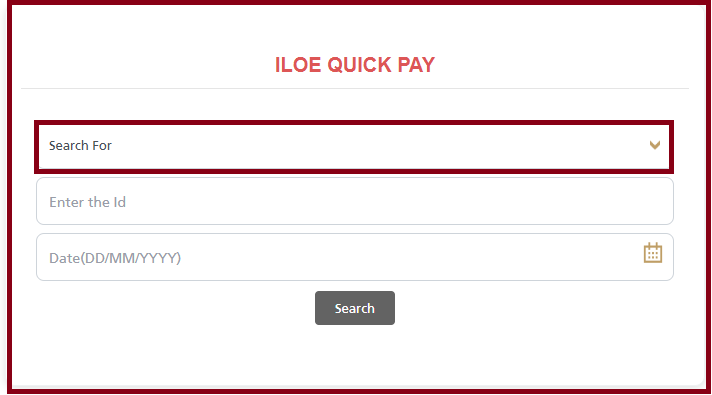
Step 5: Enter Your Emirates ID (EIDA) Number
- Now, you will be asked to enter your EIDA (Emirates ID) Number. Make sure the number is accurate.
Step 6: Enter the Required Date
- Next, fill in the date as requested in the form.

Step 7: Click the “Search” Button
- After entering all details, click on the “Search” button to view the results.

Note:
- If you have any pending fines, they will be shown on the screen.
- If you do not have any fines, the result will show “No Record Found” or “No Fines”.
MOHRE Fine Check By Mohre App
Follow some steps to Check MOHRE Fine By Mohre App:
- Step 1: Download the MOHRE app from either the Apple App Store or Google Play Store on your smartphone.
- Step 2: Open the app and log in using your UAE Pass or Emirates ID credentials for secure access.
- Step 3: After logging in, go to the ‘Insurance Services’ section within the app.
- Step 4: Select the ‘Unemployment Insurance’ option to view details related to your insurance.
- Step 5: The app will display important information, including:
- Your insurance validity period
- The status of your payments
- Any overdue fines along with their respective deadlines
By following these steps, you can easily stay updated on your unemployment insurance status and manage any pending fines efficiently.

MOHRE Pay Fine PDF
UAE Fine Check By GDRFAD
Follow some steps to check fine by GDRFAD:
- Visit to the official GDRFAD website.
- Click on the Fine enquiry icon.
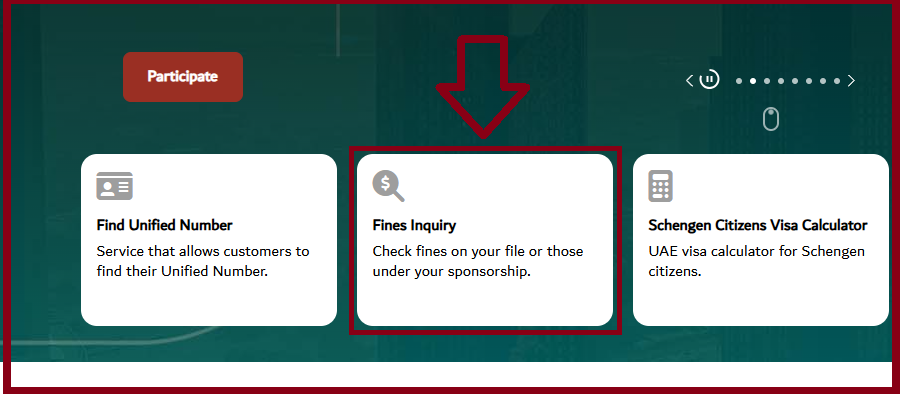
- Please click your Fine method like:
- File Number
- UDB Number
- Emirates ID
- Passport Number
- Enter your required information as File Number and Nationality.
- Enter Date of Birth.
- Select your Gender and fill out the Captcha.
- Click on the Submit Button
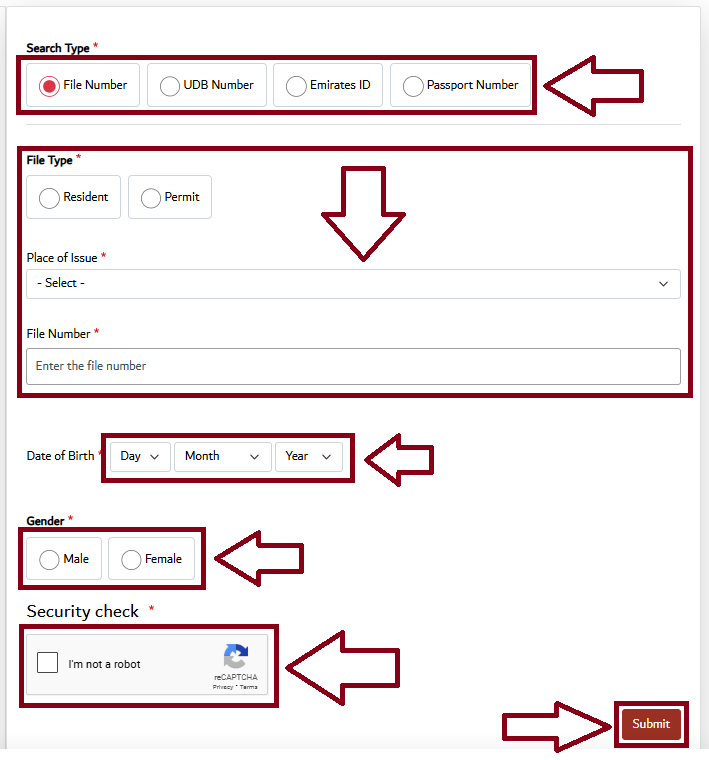
- After click on the Submit button and View the Fine enquiry.
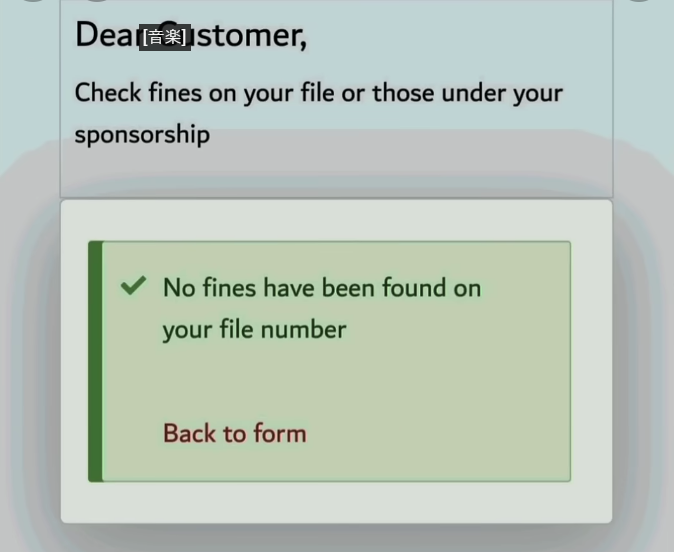

Note:
- If you have any pending fines, they will be shown on the screen.
- If you do not have any fines, the result will show “No Record Found” or “No Fines”.
How to Check Your ICP Fine Check Online
If you want to check your ICP (Identity and Citizenship Portal) fine, follow the steps below:
Step 1: Visit the Official ICP Fines Portal
- Go to the official ICP Fine Services Portal using a secure internet browser.
Step 2: Choose the “File Number” Option
- On the homepage, select the “File Number” option from the available modules.
Step 3: Enter Required Details
- Fill in the following information accurately:
- Your File Number
- Your Date of Birth
Step 4: Select Your Nationality
- From the drop-down menu, select your current nationality.
Step 5: Complete the Captcha
- Solve or enter the Captcha Code exactly as shown to verify you’re not a robot.
Step 6: Click on the “Search” Button
- Once all the information is entered correctly, click the “Search” button.
Step 7: View Your Fine Details
- After clicking search, your fine details (if any) will appear on the screen.
How to Check UAE Traffic Fines for Dubai
If you’ve been driving in Dubai and want to ensure you don’t have any outstanding traffic fines, it’s easy to check your status online. Here’s how you can check Dubai traffic fines quickly using the official Dubai Police website.
Step 1: Visit the Official Website
Go to the official Dubai Police website.
Step 2: Navigate to Traffic Services
- On the homepage, look for the “Traffic Services” section.
- Click on “Fines Inquiry” from the dropdown menu.
Step 3: Enter Your Details
- Choose “Emirates ID” as the method of inquiry.
- Enter your Emirates ID number or relevant vehicle details.
- Click on “Submit” to view any outstanding traffic fines.
Who Needs to Check MOHRE Fines?
Both employers and employees should be aware of their legal status with MOHRE. Here’s why:
For Employers
- To avoid operational suspension.
- To ensure smooth visa and labour card processing for workers.
- To maintain a clean compliance record.
For Employees
- To confirm no fines are attached to their labour file.
- To avoid issues during visa renewal or cancellation.
- To ensure the employer is not violating labour rights.

How to Pay MOHRE Fines
Once you’ve performed the MOHRE fine check and identified outstanding dues, here’s how to pay:
- Log in to the MOHRE website or app.
- Go to the “Pay Violations” section.
- Select the fine to be paid.
- Use a debit/credit card to make the payment securely.
What to Do if You Dispute a MOHRE Fine
If you believe a fine has been incorrectly applied, you can:
- Submit a complaint through the MOHRE website or app.
- Visit a Tasheel or MOHRE customer happiness center.
- Provide supporting documents to justify your claim.
- Follow up on the dispute until resolution.
Tips to Avoid MOHRE Fines
- Always renew labour contracts and permits before they expire.
- Pay salaries on time using the Wages Protection System (WPS).
- Maintain proper housing and accommodation for workers.
- Avoid employing undocumented or visa-violated workers.
- Stay updated with MOHRE notifications and legal changes.
Why You Should Regularly Do a MOHRE Fine Check
Regularly performing a MOHRE fine check is essential for the following reasons:
- Ensures compliance with labour laws
- Avoids legal consequences or business suspensions
- Allows timely fine payments to avoid additional penalties
- Keeps your immigration and labour status clean
For employers, regular checks help ensure that the company remains in good standing. For employees, it confirms that their visa and labour file are free of issues.
FAQs About MOHRE Fine Check
What is a MOHRE fine?
Ans: A MOHRE fine is a penalty issued by the Ministry of Human Resources and Emiratisation in the UAE for violations of labour laws, such as delayed salary payments or failing to renew work permits.
How can I check if I have a MOHRE fine?
Ans: You can check for MOHRE fines through the official MOHRE website or mobile app by entering your Emirates ID or labour file number under the ILOE Quick Pay section.
Can MOHRE fines be disputed or appealed?
Ans: Yes, if you believe a fine was wrongly issued, you can file a dispute through the MOHRE website, app, or visit a Tasheel/MOHRE service center with supporting documents.
Conclusion
Regularly checking your MOHRE fines is a simple yet essential step for both employees and employers in the UAE. It helps ensure compliance with labour laws, avoids unexpected legal issues, and maintains a clean employment record. With easy access through the MOHRE website and mobile app, staying informed has never been more convenient. By taking proactive steps, you contribute to a transparent and responsible work environment in the UAE.