UAE Pass 2026: A Guide To Register, Login And Use Secure Online Services
UAE Pass. In today digital age, the UAE Pass stands as a transformative innovation, empowering citizens, residents, and visitors in the United Arab Emirates with a secure and unified digital identity. As the country continues its journey toward a fully digitized government, the UAE Pass plays a pivotal role in simplifying access to a wide range of government and private sector services.
Whether you’re applying for an online document, verifying your identity, or signing a contract digitally, the UAE Pass is your gateway to easily, paperless services.
What is UAE Pass?
The UAE Pass is a national digital identity and signature solution for all citizens, residents, and visitors in the UAE. It allows individuals to access government websites, sign documents digitally, and verify their identity via their smartphone eliminating the need for physical visits or manual paperwork.
This initiative is a joint venture between the Telecommunications and Digital Government Regulatory Authority (TDRA), Smart Dubai, and Abu Dhabi Digital Authority, in collaboration with local and federal entities.
Requirements of UAE Pass
Here are some requirements
- Emirate ID
- Mobile Number
UAE Pass Registration Or sign up Online

Follow some steps to Sign up the UAE Pass.
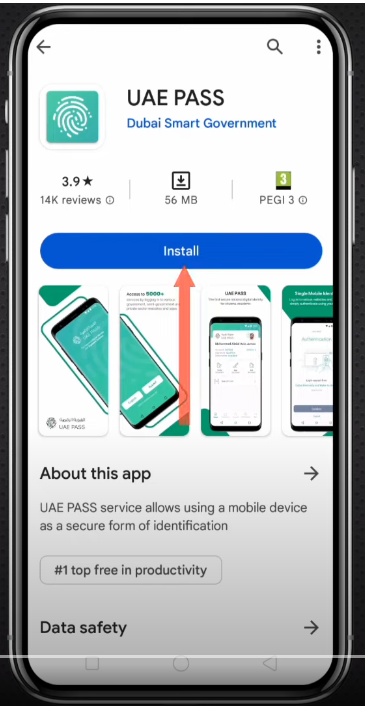
- Download and install the UAE Pass App form the Google Play Store and App Store.
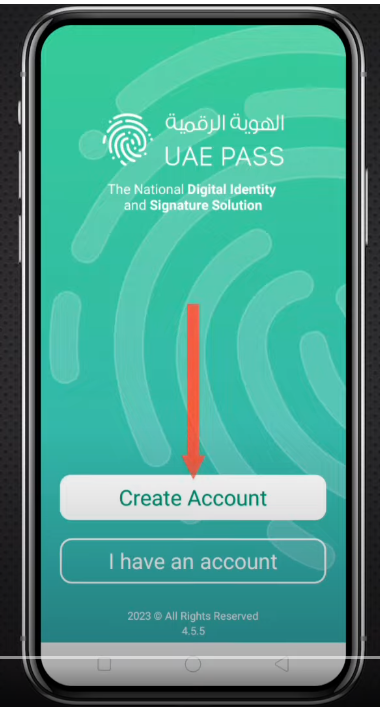
- Open the app and click the Create account button.
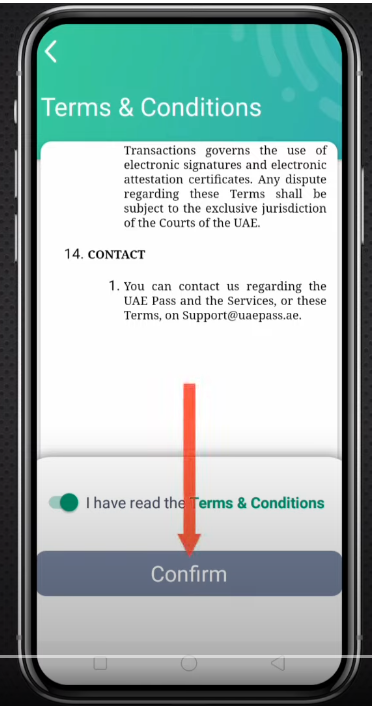
- Read the Trem and Condition and click the Confirm button.
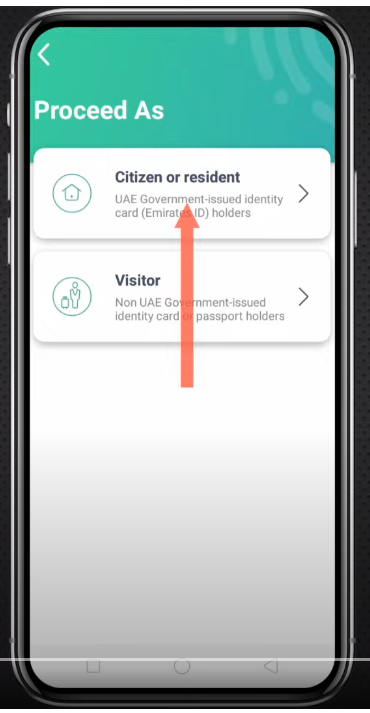
- Click the Citizen or residence option.
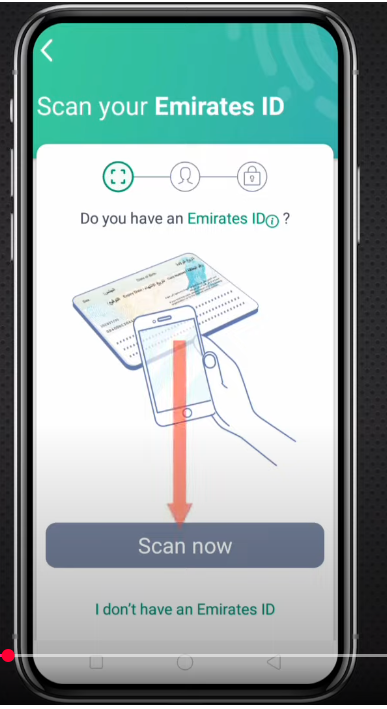
- Do you have Emirates ID? Click Scan Now Button.
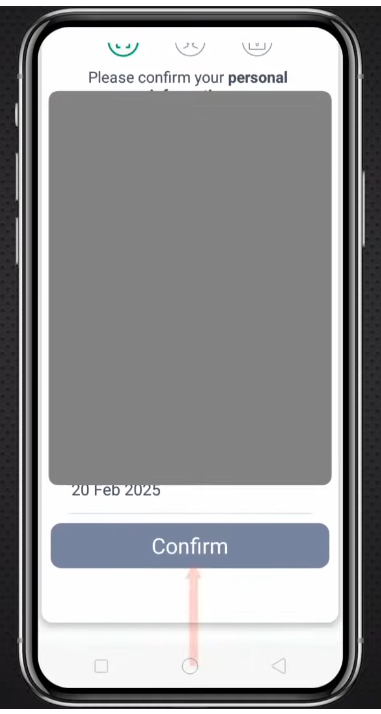
- Click the Confirm button.

- Enter your Mobile Number and Email and Click Continue Button.
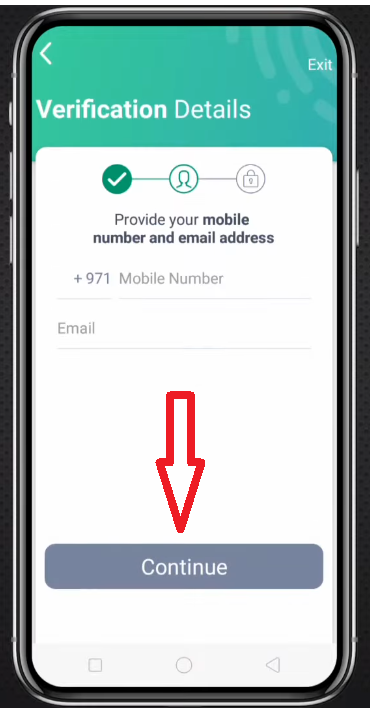
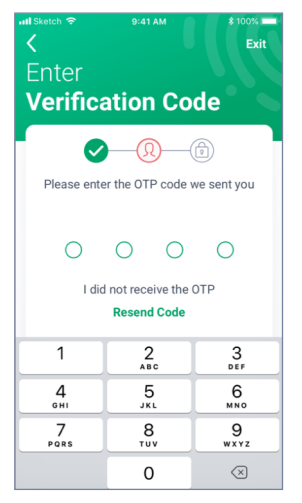
- After click continue button, you receive a OTP form SMS and Enter OTP.
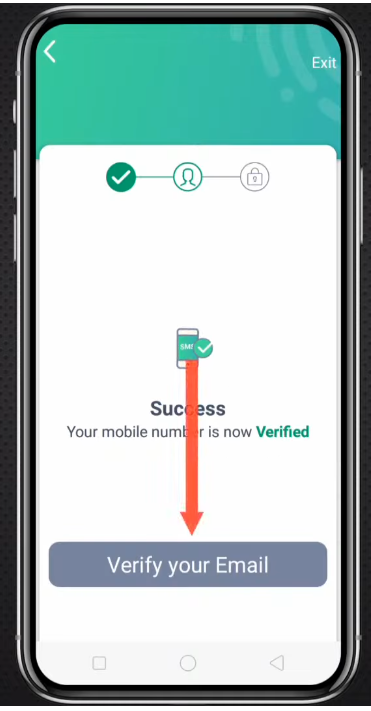
- Please Verify Your Email and click Verify your email Button.
- After verify Email click the Set Your Pin button.
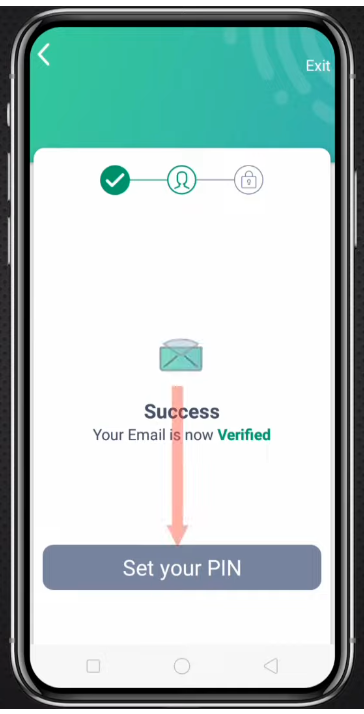
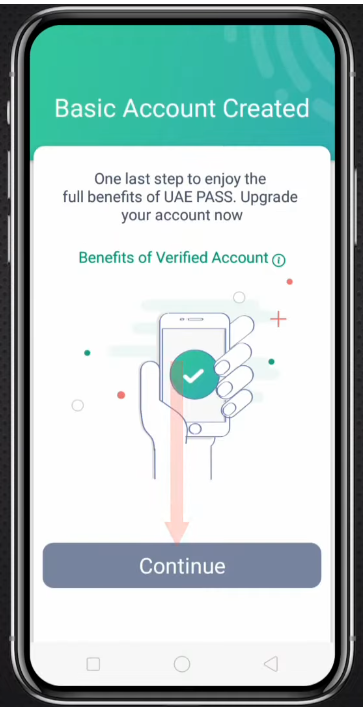
- After set your pin, Click Continue Button,
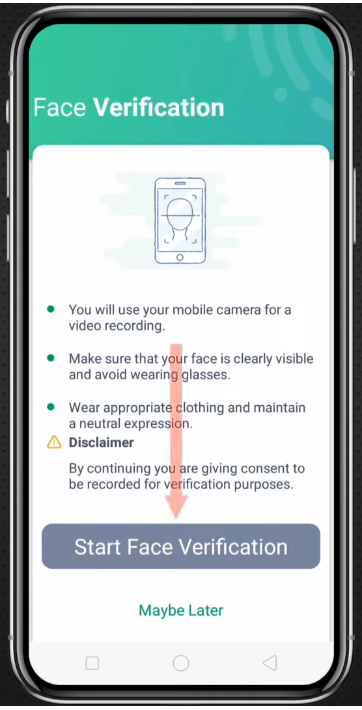
- Please verify Your Face , Click Start Face Veridication button.

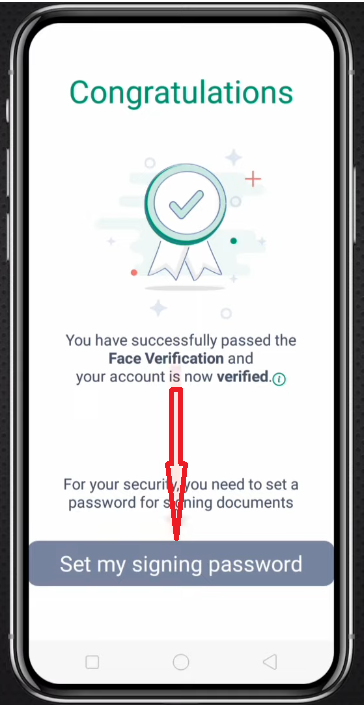
- After Face Verification , Please Set My Signing My Password button.
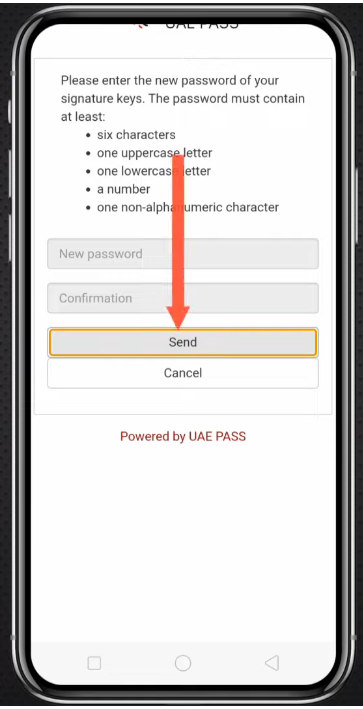
- Enter your New Password and Confirm your Password and click Sent button.
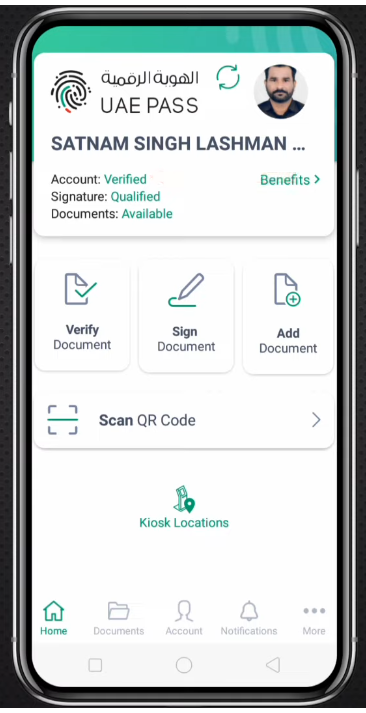
- After set your Password, to view your Dashboard of UAE PASS.
UAE PASS Login Online
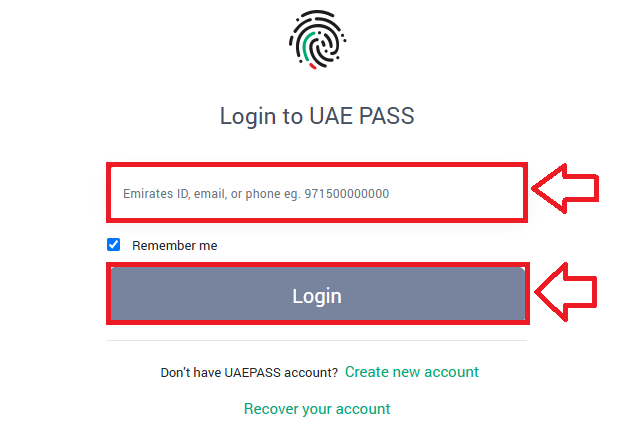
Follow some steps to login UAE PASS.
- Visit to the Official UAE PASS website.
- Enter your Emirates ID number or email or Phone number.
- Click the Ligin button.
How to Download the UAE PASS APP
Downloading the UAE Pass app is quick and easy. Just follow these steps:

- Open Your App Store
- If you’re using an Android device, go to the Google Play Store.
- If you’re using an iPhone, open the Apple App Store.
- Search for “UAE Pass”
- In the search bar, type “UAE Pass” and press enter.
- Find the Official App: Look for the official UAE Pass app developed by the UAE government.
- Tap “Install”
- Click on the Install button.
- Wait for the app to download and install on your phone.
- Open the App
- Once installed, tap on the app icon to open UAE Pass.
- You’ve successfully downloaded and opened your UAE Pass app.
How to Recover your UAE PASS Account.
If you’ve lost access to your UAE Pass account, follow these easy steps to recover it:
- Open the UAE Pass App Or go to the official UAE Pass website.
- Select “I have an existing account” Or tap on “Recover your account”.
- Agree to the Terms and Conditions
- Tick the box for “I have read the Terms & Conditions”.
- Carefully read the information shown.
- Tap “Accept” to continue.
- Enter Your Account Details: Type in your email address, mobile number, or UAE Pass ID linked to your account.
- Verify Your Identity
- Follow the prompts to confirm your identity.
- This may involve facial recognition or other verification methods.
- Set a New PIN: Once verified, you will be asked to create a new 4-digit PIN.
- Account Recovery Complete: You can now access your UAE Pass account with the new PIN.
How to Update Emirates ID in UAE PASS
Follow some steps to update your Emirates ID In UEA Pass.
- Open the Mobile App: Launch the Mobile app on your smartphone.
- Go to the ID Update Section: Navigate to the section labeled “ID Update”, “Renew Emirates ID”, or “Personal Information”.
- Log In Using UAE Pass: Choose the “Log in with UAE Pass” option to begin the secure authentication process.
- Allow Access to Emirates ID Info: Grant permission for the app to access your Emirates ID details stored in your UAE Pass profile.
- Review and Confirm: Carefully check the information displayed, then confirm and submit your update request.
- Confirmation: Once done, you’ll receive a confirmation message or email notifying you that your Emirates ID has been successfully updated.
Who is eligible Or Use for the UAE PASS?
The UAE Pass is designed for UAE citizens and residents who have a valid Emirates ID. It acts as the country’s first national digital identity, helping users easily access a wide range of services online.
Here’s a closer look at how it works:
- For Citizens and Residents: Anyone living in the UAE with a valid Emirates ID can use UAE Pass. It’s available to both locals and expatriates.
- Secure Digital Identity: The app gives each user a safe and verified digital identity, allowing them to log in to multiple platforms without needing separate usernames and passwords.
- Access to Online Services: With UAE Pass, users can access over 6,000 online services offered by government, semi-government, and even private companies—all through one app.
- Digital Document Signing: Users can also digitally sign documents, meaning there’s no need to go to service centers or print paperwork.
Where Can You Use UAE Pass?
The UAE Pass is accepted across numerous services, including:
Government Services
- Dubai Police
- Federal Authority for Identity and Citizenship (ICP)
- Dubai Electricity and Water Authority (DEWA)
- Ministry of Interior (MOI)
- Roads and Transport Authority (RTA)
Municipal Services
- Ajman Municipality
- Abu Dhabi Municipality
- Sharjah Municipality
Healthcare & Education
- Ministry of Health and Prevention
- Local universities and academic institutions
Private Sector Services
- Banks (Emirates NBD, Mashreq, etc.)
- Utility providers
- Real estate companies
- Insurance companies
Key Features of UAE Pass
| Feature | Description |
|---|---|
| Digital Identity | Acts as a unified login for all UAE government and private services |
| Digital Signature | Legally binding digital signature feature for official documents |
| Document Vault | Secure storage and retrieval of digital documents issued by government |
| Face Recognition | Advanced biometric face recognition to verify identity |
| No Physical Visit Needed | Enables 100% online service access from anywhere |
| Available on App Stores | Free mobile app on iOS and Android platforms |
Benefits of Using UAE Pass
Highlighting the advantages of UAE Pass, here’s why every resident should register:
- Single Sign-On Access: Use one login across all federal, local, and private services.
- Legally Valid Digital Signatures: Sign contracts, applications, and letters electronically with full legal recognition.
- Time and Cost Efficiency: Say goodbye to queues and paperwork services are now just a few taps away.
- Paperless Transactions: Contributes to the UAE sustainability and smart city initiatives.
- Secure Authentication: Protects your identity with face recognition and biometric verification.
FAQs About UAE PASS
What is UAE Pass and how does it work?
UAE Pass is the UAE official national digital identity and signature solution. It allows users to securely access online government services and digitally sign documents using biometric authentication (face/fingerprint) and OTP. Once activated, it acts as a unified credential across platforms.
Can I use UAE Pass for non-government services?
Yes! Beyond public services, UAE Pass is integrated with various private-sector apps banks, telecoms, real estate, and utilities for secure identity verification and digital signature use, saving time on paperwork and in-person verification.
Is UAE Pass secure and legally accepted?
Absolutely. It uses encryption, biometric verification, and multi-factor authentication. Digital signatures through UAE Pass are recognized under UAE law (Federal Law No. 1 of 2006), making them legally binding and admissible as evidence.
Can I use UAE PASS on my phone?
Yes, you can use UAE PASS on your phone. Just download the UAE PASS app from the App Store or Google Play, sign in, and verify your identity. After that, you can use it to access all UAE government services anytime.
Conclusion
In conclusion, UAE Pass is a powerful tool that simplifies digital interactions across the UAE. From secure identity verification to seamless document signing, it empowers users with convenience, privacy, and efficiency. As the nation embraces digital transformation, adopting UAE Pass ensures faster access to vital services mmaking it an essential app for every UAE resident and citizen.