MOHRE Labour Card Download – How Can I Download A Labour Card From Mohre?
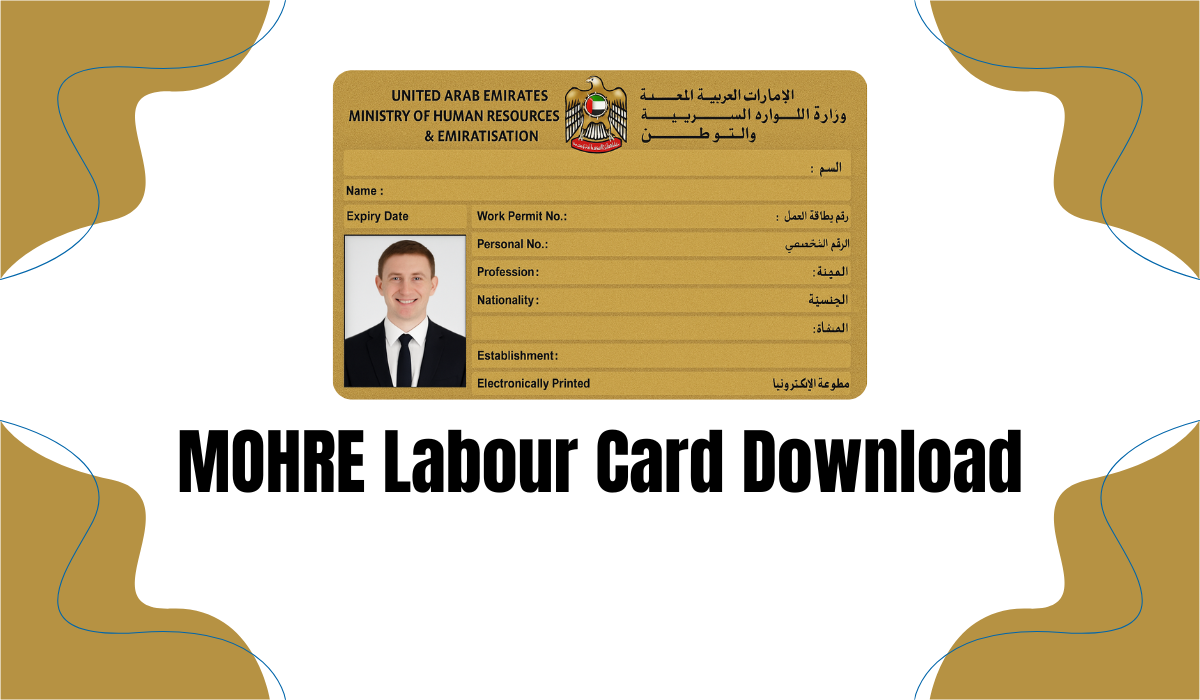
MOHRE Labour Card Download. The MOHRE Labour Card is a vital document issued by the Ministry of Human Resources and Emiratisation (MOHRE) in the UAE. Whether you’re an expat employee or employer, this card contains essential details about your job status, employer, contract, and employment rights.
In this detailed guide, we explain how to download your MOHRE Labour Card, what details are included, who is eligible, and why it’s important.
What Is the MOHRE Labour Card?
The MOHRE Labour Card (sometimes called the UAE Work Permit or Employment Card) is an official document issued by the Ministry of Human Resources and Emiratisation. It verifies a person’s legal employment status and contains the following details:
- Full name of the employee
- Labour Card number
- Passport number
- Employer’s name and trade license number
- Job title and profession
- Employment contract type (limited/unlimited)
- Nationality and gender
- Issue and expiry date of the work permit
This card is proof that the worker is legally employed in the UAE under a registered employer.

Eligibility to Get a MOHRE Labour Card
To obtain a MOHRE Labour Card in the UAE, an individual must:
| Criteria | Requirement |
|---|---|
| Age | Must be between 18–60 years old |
| Employment Status | Must be working under a registered UAE employer |
| Medical Fitness | Must pass a UAE medical fitness test |
| Valid Visa & Passport | Must hold a valid UAE residence visa and passport |
| Labour Contract | Must have an approved MOHRE labour contract |
How to Download MOHRE Labour Card Online
Downloading your labour card is easy and free. Here’s how you can do it directly from the official MOHRE website.
Step 1: Visit the MOHRE Website
Go to the MOHRE official website. This is the UAE government’s official platform for labour and employment services.
Step 2: Navigate to Enquiry Services
From the homepage, click on “Services”, then select “Enquiry Services” from the drop-down menu.

Step 3: Select the Print Electronic Work Permit Option
Scroll through the options until you find “Print Electronic Work Permit”. Click on it to proceed.
Step 4: Enter Required Details
You’ll need to input your Work Permit Number or Labour Card Number, which can usually be found in your employment contract or by asking your HR department.
Step 5: Click the Search Button
After entering your information, click on the Search button. The system will fetch your electronic labour card details.
Step 6: Download or Print Your Labour Card
Once your card appears, click on the Print / Download button. You can either save it as a PDF or print a physical copy for your records.
Alternative Ways to Access Your Labour Card
Besides using the official MOHRE website, you can also download your labour card via these methods:

MOHRE Mobile App
The MOHRE mobile application (available on iOS and Android) offers a convenient way to access your MOHRE labour card:
- Download the MOHRE app from your app store.
- Log in using your UAE Pass or Emirates ID.
- Navigate to My Documents > Work Permit.
- Tap Download or Share to save your labour card.
Why Is the Labour Card Important in the UAE?
Having your MOHRE labour card is essential for:
- Proving legal employment in the UAE
- Accessing medical services and health insurance
- Resolving labour disputes or reporting complaints
- Visa renewal and residency validation
- Accessing services like bank accounts or Emirates ID renewal
Common Issues and Solutions When Downloading Labour Card
| Issue | Solution |
|---|---|
| Cannot find Work Permit Number | Contact your HR department or check your employment contract |
| System shows “No Record Found” | Ensure the entered data is correct or contact MOHRE helpline (800 60) |
| MOHRE website not loading | Try again later or use the MOHRE mobile app |
| Need printed copy with official stamp | Visit a TASHEEL centre for an attested printed version |
Is It Safe to Download Your Labour Card Online?
Yes, downloading your labour card from the MOHRE website or mobile app is completely secure. Always ensure:
- You use the official website or app.
- Your internet connection is secure (avoid public Wi-Fi).
- You do not share your Labour Card publicly as it contains personal details.
Updating Labour Card Details
If there’s incorrect information on your labour card, your employer must apply for a correction through MOHRE. You cannot update labour card data by yourself.

Typical corrections include:
- Name spelling errors
- Job title changes
- Updated passport numbers after renewal
The employer submits these corrections via TASHEEL services or the MOHRE platform.
Labour Card vs. Labour Contract: What the Difference?
| Feature | MOHRE Labour Card | Labour Contract |
|---|---|---|
| Issued By | MOHRE | MOHRE (but prepared by employer and employee) |
| Contains | ID details, job title, permit number | Job terms, salary, working hours, termination rules |
| Download From | MOHRE Website/App | MOHRE Website/App or employer’s HR department |
| Legal Importance | Proof of work permit | Legal binding agreement between employee and employer |
Important Tips When Handling Your Labour Card
- Save a soft copy of your labour card on your device.
- Keep a printed copy for visa renewals and official uses.
- Report any incorrect information immediately to your HR department or MOHRE.
- Your labour card should always match your contract details.
FAQs About MOHRE Labour Card download
What is the MOHRE Labour Card number and where can I find it?

Ans: Your MOHRE Labour Card number is a unique identification number linked to your work permit. You can find it on your MOHRE card, employment contract, or by accessing your profile via the MOHRE website or app.
Can I download my Labour Card using Emirates ID or passport number?
Ans: Currently, the system requires the Work Permit number to access and download the labour card. However, your Emirates ID and passport number are also linked and visible in the card once retrieved.
What should I do if my MOHRE Labour Card is not showing up online?
Ans: If your card doesn’t appear after entering correct details:
- Double-check your Work Permit Number
- Try using the MOHRE mobile app
- Contact the MOHRE helpline (800 60) for assistance
- Visit a TASHEEL centre with your documents
Conclusion
The MOHRE Labour Card is an essential document for every legal worker in the UAE. Whether you’re a new employee, renewing your visa, or just need a copy for official processes, knowing how to download your MOHRE Labour Card online will save you time and trouble.